
Hi Everyone,
I have gotten some comments about how smooth my background is getting and how my processing is improving. I thought I would share a little of what I am learning. Bear with me if you already know all about this, I am just learning. 8)
I just thought I would say a little about curves in Photoshop and why
they are helpful as well as better for most stretching of the data.
First off, a curve can be applied several times as needed without
destroying detail or blowing out the center of a galaxy or cluster.
Then, it is a better method of controlling the stretch, as you do it
in more ways than a simple stretch.
I find that the curve is getting me closer to what I think I want to
see from a sub. I can change the curve slightly from the standard
during the final application of the curve to attain some nuance of
tone or detail that I think is there.
The standard curve is the beginning and then a modified curve can
finish when the standard is too much.
Also, balancing the background is really important, otherwise you end
up with a color noise, from one or more colors.
Over stretching is the most common mistake that I see in post
processing. We all are guilty of trying to get more out of a sub than
is actually there. This is a definite no no!
Good filters are also the key to color balance. Try to get the best
you can when you buy filters. Of course you have to stay within
budget, but a good shopper can find a deal! :^)
Stacking is another place where much improvement can be made. Culling
the bad subs from the stack gives you the cleanest data. So if it does
not look good, dump it! The stacking method used by the program is
also a big deal. Try several of the choices to see what does the best
job. Try different programs if you get a chance, especially if they
give a trial version for free. I am beginning to believe that AIP4Win
V2 is one of the best that I have used so far and it is a reasonable
price and comes with a great book too! What a deal!
I do what is for me a standard stretch in FITS Liberator. This is
setting the black point to 100 and then the white point at the end of
the data. I try to set RGB at the same white and black point, usually
100 and 30,000, but it depends on the object.
The luminance I set the black point to 100 and the white to 65,000.
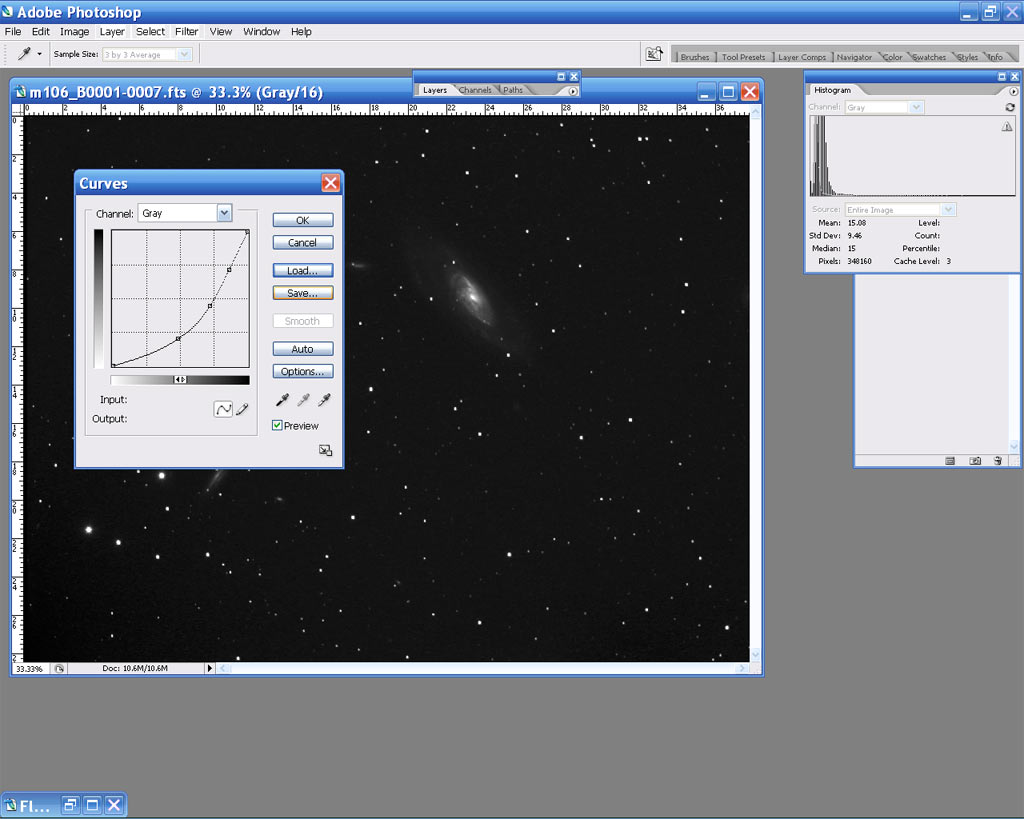
I use the standard curve that Ron Wodaski shows, which is two points
equally spaced across, with the second point down and a straight line
between the second and the top. Hope that makes sense. I could take a
screen shot of it possibly.
Then I will stretch the data with the center slider in the histogram
if needed. I always take it to the end of the slope and then slide the
left slider to set the back ground to 91 k on RGBL subs before I start
to do any other adjustments. I never clip the black point to achieve
this and will leave a little space between the slope foot and the left
side of the histogram. Then I will adjust the final black point if
needed after all other post processing is complete.
Background noise is caused by too much stretching as much as anything.
But Carboni Actions, Deep Space Noise Reduction, will help if there is
some residual noise. I try not to use it unless I have to, preferring
to set the histogram to get rid of the noise. So if you slide the
histogram slider too far and noise develops, just slide it back to the
right until the noise is gone. If you need more stretch, then you
actually need more exposures or longer ones. This is how I keep the
noise down and the background color or darkness just the way I want it.
Hope this helps.
Floyd
I have gotten some comments about how smooth my background is getting and how my processing is improving. I thought I would share a little of what I am learning. Bear with me if you already know all about this, I am just learning. 8)
I just thought I would say a little about curves in Photoshop and why
they are helpful as well as better for most stretching of the data.
First off, a curve can be applied several times as needed without
destroying detail or blowing out the center of a galaxy or cluster.
Then, it is a better method of controlling the stretch, as you do it
in more ways than a simple stretch.
I find that the curve is getting me closer to what I think I want to
see from a sub. I can change the curve slightly from the standard
during the final application of the curve to attain some nuance of
tone or detail that I think is there.
The standard curve is the beginning and then a modified curve can
finish when the standard is too much.
Also, balancing the background is really important, otherwise you end
up with a color noise, from one or more colors.
Over stretching is the most common mistake that I see in post
processing. We all are guilty of trying to get more out of a sub than
is actually there. This is a definite no no!
Good filters are also the key to color balance. Try to get the best
you can when you buy filters. Of course you have to stay within
budget, but a good shopper can find a deal! :^)
Stacking is another place where much improvement can be made. Culling
the bad subs from the stack gives you the cleanest data. So if it does
not look good, dump it! The stacking method used by the program is
also a big deal. Try several of the choices to see what does the best
job. Try different programs if you get a chance, especially if they
give a trial version for free. I am beginning to believe that AIP4Win
V2 is one of the best that I have used so far and it is a reasonable
price and comes with a great book too! What a deal!
I do what is for me a standard stretch in FITS Liberator. This is
setting the black point to 100 and then the white point at the end of
the data. I try to set RGB at the same white and black point, usually
100 and 30,000, but it depends on the object.
The luminance I set the black point to 100 and the white to 65,000.
I use the standard curve that Ron Wodaski shows, which is two points
equally spaced across, with the second point down and a straight line
between the second and the top. Hope that makes sense. I could take a
screen shot of it possibly.
Then I will stretch the data with the center slider in the histogram
if needed. I always take it to the end of the slope and then slide the
left slider to set the back ground to 91 k on RGBL subs before I start
to do any other adjustments. I never clip the black point to achieve
this and will leave a little space between the slope foot and the left
side of the histogram. Then I will adjust the final black point if
needed after all other post processing is complete.
Background noise is caused by too much stretching as much as anything.
But Carboni Actions, Deep Space Noise Reduction, will help if there is
some residual noise. I try not to use it unless I have to, preferring
to set the histogram to get rid of the noise. So if you slide the
histogram slider too far and noise develops, just slide it back to the
right until the noise is gone. If you need more stretch, then you
actually need more exposures or longer ones. This is how I keep the
noise down and the background color or darkness just the way I want it.
Hope this helps.
Floyd
Attached Image:
[SIZE="Large"][/SIZE][COLOR="Blue"][/COLOR] Floyd Blue

Amateur Imager
