Image of the day

Captured by
james carter

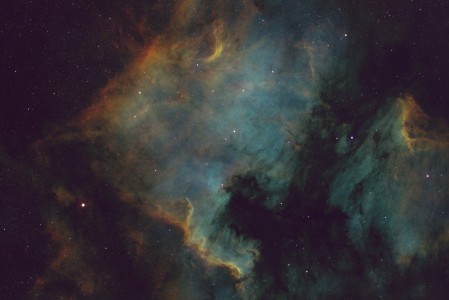
North American Nebula NGC7000

My Account

New to Astromart?

Register an account...

Need Help?

How does this look on your monitor?

Started by fblue, 04/15/2013 11:00PM
Posted 04/15/2013 11:00PM Opening Post
I am trying to get my monitor adjusted for color, Gama and Contrast. I would like some input on this image for that purpose. I just did this one and I did it with the settings I am not using.

So, too dark, too light, too red or other?

It has a dark background on my monitor.


Attached Image:

fblue's attachment for post 57378

[SIZE="Large"][/SIZE][COLOR="Blue"][/COLOR] Floyd Blue grin
Amateur Imager
Posted 04/15/2013 11:33PM #1
Looks pretty good. Maybe a tad dark.
Posted 04/19/2013 02:15PM | Edited 04/19/2013 02:18PM #2
Hi Floyd,
This is certainly the right place to go for an opinion. There are several spectrometers available for calibrating both the monitor and printer profiles. You might consider an i1Photo Pro 2 Color Management Kit available from B&H and others...

Floyd, another very nice image, looks good on any monitor!

Regards,
Dave