

Hello all,
I recently posted a image of M31 which I thought I did a good job on
in processing. I am now in the process of processing my most recent
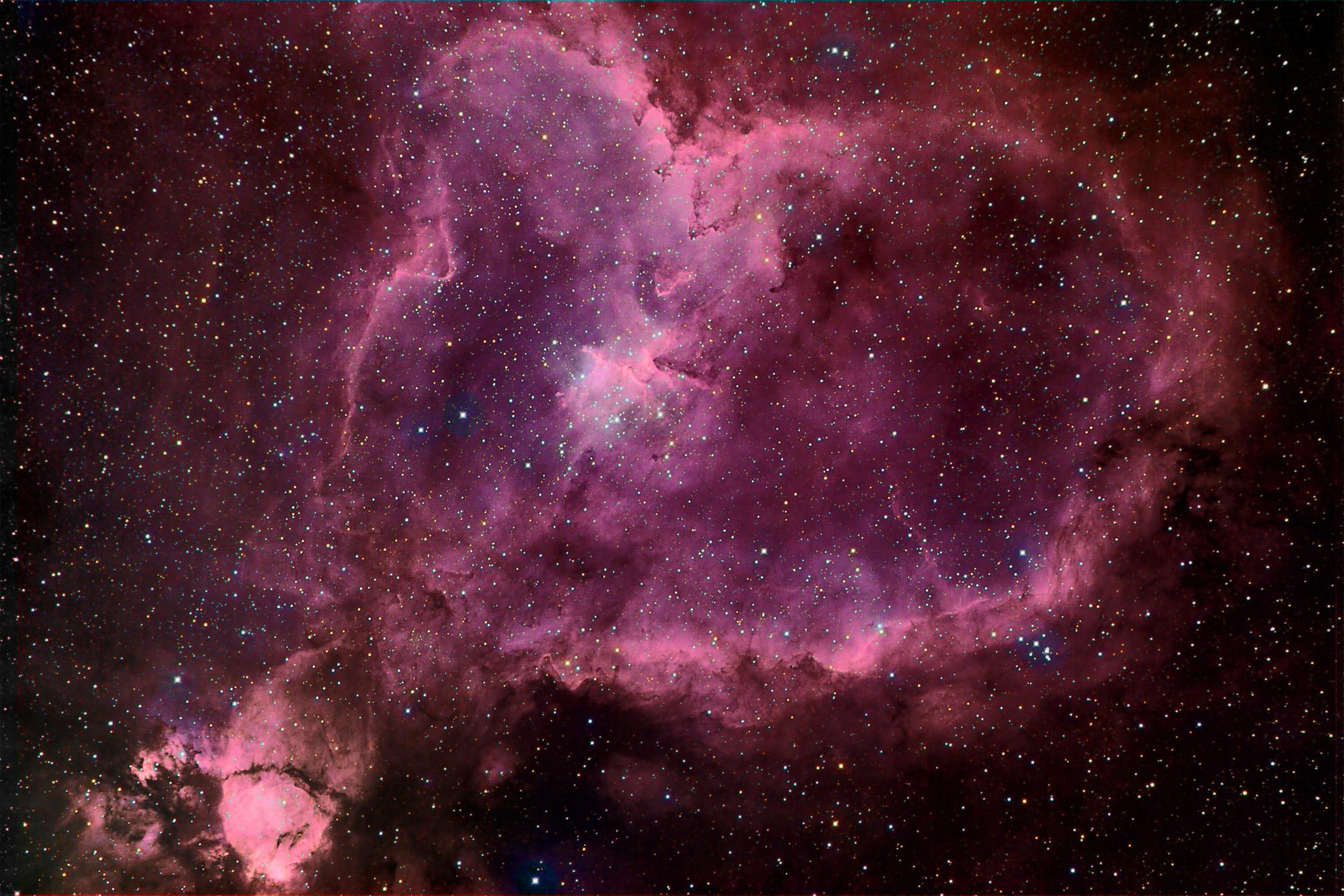
work, which is IC1805, or the Heart Nebula. I am using a Takahashi
Epsilon 250, Paramount, and STL-11000M. For this image, I have 15
total hours of exposure: 7 hours of Ha (for luminance binned 2x2,
which yes I know was a mistake but I have to deal with it now), and
the rest devided evenly between RGB (also binned 2x2).
Now I have some questions about processing this image. I dont
consider this image finished by any means. I think I may have
overprocessed it, but I am finding it difficult to process this image
because of the wide range of brightnesses th nebula takes since it
occupies almost the entire frame. This makes selections for blurring
and sharpening difficult to determine. I think this image has much
potential, but I believe Ill have to start over with the combined RA,
R, G, and B frames in photoshop.
A few particulars I have questions about:
1)I think the color data has too much noise in the dim nebulosity
areas. Since I am an idiot and accidently binned my Ha Luminance
frame 2x2, will I lose sharpness if I process the RGB for brightness
levels only. I think I tried to bring out sharpness detail in the
color frames too much. So all in all, is it ok to process the Ha
Luminance frame for sharpness and leave the color frames along in
this respect?
2)In trying to get my color balance right, I think I have stretched
out the red data too much. I say this because in some of the darker
areas, there are dim, red stars. I am assuming they are all red in
color because they are brighter in the red channel, and may not even
show up in G and B. Does this explanation seem plausible?
3)The Epsilon 250 seems to have some nasty internal reflections at
short wavelengths. Note the bluish halos around the brighter stars.
Any Epsilon owners know how to process that out? It would normally be
fine in an LRGB image where L is the all spectrum image, but since
the halos dont show up at all in the Ha data, the blending of the Ha
and color makes the halos really stand out and I am not sure if I
like it or not.
4) I also think there might be a slight G gradient in the lower left
corner. Any ideas on how to get rid of that without buying new
software. I originally removed a larger gradient in G using the
NewAstro Gradient remover for CCDSoft.
Anyways let me know of any comments or suggestions and answers to the
above questions. I appreciate it. I just spent so much time imaging
this object, I would love to see this image look stunning. Thank You.
Taylor
I recently posted a image of M31 which I thought I did a good job on
in processing. I am now in the process of processing my most recent
work, which is IC1805, or the Heart Nebula. I am using a Takahashi
Epsilon 250, Paramount, and STL-11000M. For this image, I have 15
total hours of exposure: 7 hours of Ha (for luminance binned 2x2,
which yes I know was a mistake but I have to deal with it now), and
the rest devided evenly between RGB (also binned 2x2).
Now I have some questions about processing this image. I dont
consider this image finished by any means. I think I may have
overprocessed it, but I am finding it difficult to process this image
because of the wide range of brightnesses th nebula takes since it
occupies almost the entire frame. This makes selections for blurring
and sharpening difficult to determine. I think this image has much
potential, but I believe Ill have to start over with the combined RA,
R, G, and B frames in photoshop.
A few particulars I have questions about:
1)I think the color data has too much noise in the dim nebulosity
areas. Since I am an idiot and accidently binned my Ha Luminance
frame 2x2, will I lose sharpness if I process the RGB for brightness
levels only. I think I tried to bring out sharpness detail in the
color frames too much. So all in all, is it ok to process the Ha
Luminance frame for sharpness and leave the color frames along in
this respect?
2)In trying to get my color balance right, I think I have stretched
out the red data too much. I say this because in some of the darker
areas, there are dim, red stars. I am assuming they are all red in
color because they are brighter in the red channel, and may not even
show up in G and B. Does this explanation seem plausible?
3)The Epsilon 250 seems to have some nasty internal reflections at
short wavelengths. Note the bluish halos around the brighter stars.
Any Epsilon owners know how to process that out? It would normally be
fine in an LRGB image where L is the all spectrum image, but since
the halos dont show up at all in the Ha data, the blending of the Ha
and color makes the halos really stand out and I am not sure if I
like it or not.
4) I also think there might be a slight G gradient in the lower left
corner. Any ideas on how to get rid of that without buying new
software. I originally removed a larger gradient in G using the
NewAstro Gradient remover for CCDSoft.
Anyways let me know of any comments or suggestions and answers to the
above questions. I appreciate it. I just spent so much time imaging
this object, I would love to see this image look stunning. Thank You.
Taylor
Attached Image:


