Image of the day

Captured by
RICHARD COFER

Lunar Occultation of Jupiter (Egress)

My Account

New to Astromart?

Register an account...

Need Help?

M95 Processing Question

Started by Chris1, 05/12/2012 01:13PM
Posted 05/12/2012 01:13PM Opening Post
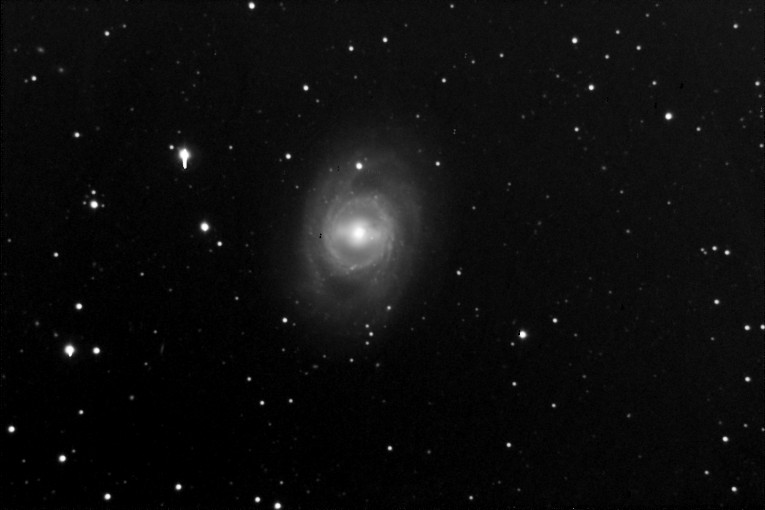
As you can see, this image has numerous black dots right on M95 (naturally). What are these? Are these cold pixels? How do you remove them?

This is a combination of nine images taken with a C11 at f/6.5 with a ST-8XME. 10 minute exposures, darks and flats taken same night. Basic processing with CCDStack v2. CCDAP v5 dithered the exposures.

Chris Nisbet
Cedar, MN
Attached Image:

Chris1's attachment for post 55513
Posted 05/12/2012 05:07PM #1
Hi,
They are either cold pixels or the dark frame used has hot pixels that are not in the exposure. There is also a posiblity that the dark is OVER subtracted. Were the flats taken at the same CCD Temp and same Exposure time?
CCDStack has a Hot and Cold pixel removal in the Data Reject section that can remove these. It should be applied before you combine.

[SIZE="Large"][/SIZE][COLOR="Blue"][/COLOR] Floyd Blue grin
Amateur Imager
Posted 05/12/2012 05:15PM #2
Over and above reprocessing from the get go with cleaner darks or flats (depending on where the problem came from) you can:

Use the clone tool to past clean pixels over the black pixels.
Use the healing band aid to replace the black pixels.

You also have some blooming that needs attention and a gradient that gets lighter at the top right.

Don't get me wrong--this is a good pic. Just that nothing is ever perfect.
Alex