Image of the day

Captured by
Lawrence Parchman

Sculptor Galaxy (NGC 253)

My Account

New to Astromart?

Register an account...

Need Help?

Round 2 - Alignment help?

Started by hakescl, 10/15/2008 04:11AM
Posted 10/15/2008 04:11AM Opening Post
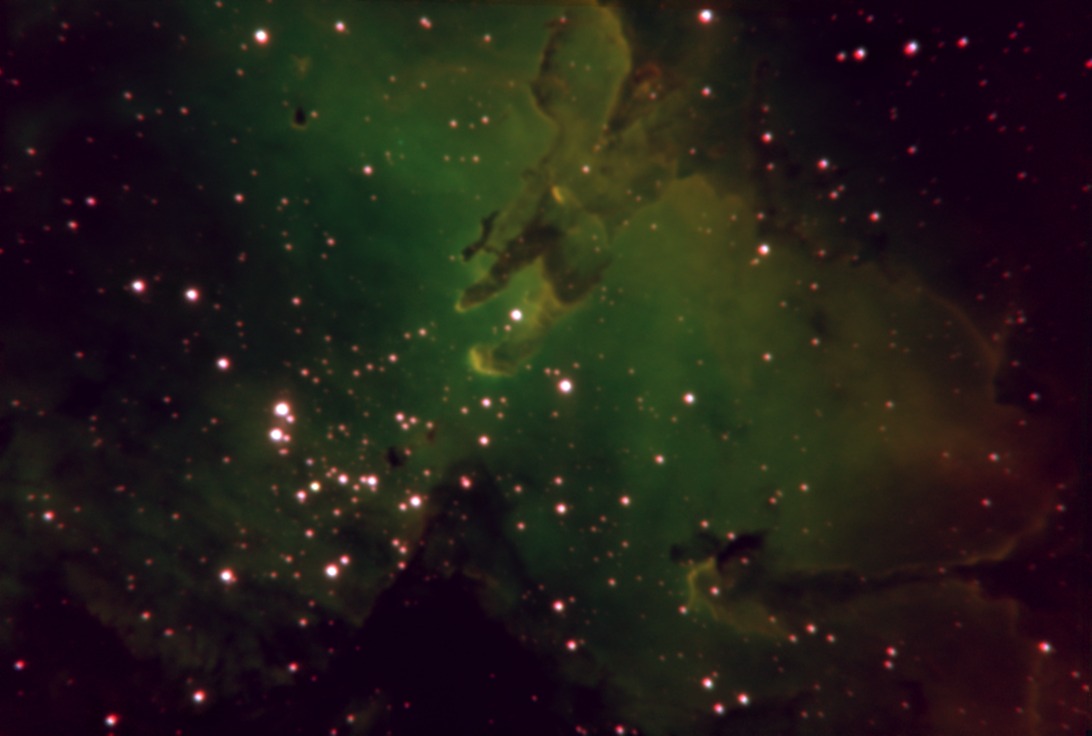
I don't know if any of you refractor types have this problem, and I don't seem to notice this with "regular" RGB filters, but apparently there is a different effective focal length with the various different narrow band filters in this image (and others I notice in retrospect). So... my question is how to fix it?

My typical processing has me acquire, reduce, and align in CCDSoft, and I have been combining using Sigma Beta Combine. But Sigma Beta has no aligning or scaling function. I'll bet programs exist that will both scale and align, but I wanted to ask what process those of you who have ever faced this are using. I guess something that works on a folder at a time?

Thanks for any help.

Charlie


Attached Image:

hakescl's attachment for post 44200

Fort Lewis Observatory: (37.238, -108.052) ~2360m (7744 ft.) elevation.
Darkness - typically 6.5+
Scope - Meade 16" LX200; f6.3 focal reducer
Focus - JMI Smart focus
Camera - SBIG ST-10XE; (~.5"/pixel)
Guiding - AO-8 and/or Meade 5"/DSI/PHD
http://www.fortlewis.edu/observatory
Posted 10/15/2008 06:31AM #1
CCDStack will scale with the alignment.
Have you got CS2 or CS3 or a late version of Photoshop. You can do some neat things with these programs, maybe with others too.
You could try to scale the different bands, making one slightly smaller by a couple of pixels and try to align them that way.
The odd thing is that the photo looks like there is a field flattener problem, as if one was shot with a flattener and the other was not. Notice how the stretching of the stars radiates from the center.
I have not seen this problem myself.

[SIZE="Large"][/SIZE][COLOR="Blue"][/COLOR] Floyd Blue grin
Amateur Imager
Posted 10/15/2008 03:10PM #2
The filters do not cause this. You are using a Meade focal reducer? You are getting lateral color, which means that the colors do not line up laterally (i.e. the image size is different for different colors)

Rolando
Posted 10/15/2008 05:09PM | Edited 10/15/2008 05:14PM #3
I can imagine an effect that would be caused by
using filters of different optical thicknesses
combined with a focal reducer. For example,
if the filters were between the focal reducer
and detector, and you focussed by adjusting the
OTA. In effect, changing the filter (more
specifically filter thickness) will change
the distance between the reducer and detector,
and hence change the effective power of the reducer.

How to fix it? In software as other have suggested.
Or adjust the glass thickness of all the filters
so it is about the same. Get diffrerent filters
specifically designed to all be the same thickness,
or add some clear glass (UV camera filters?) to
the thin ones. Also, if you focussed by moving the
detector relative to the reducer (not focussing at the
OTA) that would tend to minimize the problem.

Lateral color in the reducer, as Rolando indicates,
is also possible. There the solution might be to get
a better (more APO) reducer. Or slightly adjust
the distance between the reducer and detector, depending
on the filter wavelength.
