
I've been wondering what the GRS would look like in this $50 camera
http://setisociety.org/Jupiter5July08MVI1158L1pt4rox.jpg
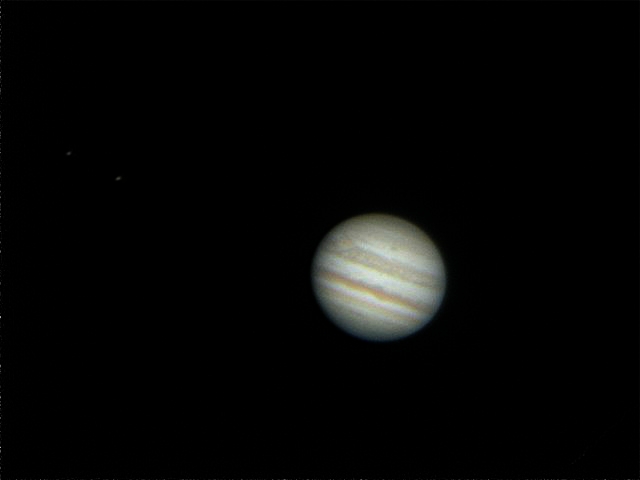
After the July 4th festivities, I saw on the Sky and Tel website that the GRS had transited, and by the time I set my stuff up I was able to catch it just before going over the limb. Although faint in my shot, I also caught Io and Europa, and according to Starry Night Pro, the moon Io is the one closer to Jupiter, the other one is Europa. Regarding the seeing, even though it was July 5th AM, there were still one or two patriotic souls blowing off their fireworks off from time to time, and I could still smell gun powder in the air. There was a large cloud deck overhead too, and I couldn't see most of the stars, but the ones I could see were low and flickering like a candle in the wind. Jupiter was right at the edge of the cloud deck for most of the abbreviated session. I could see some occasional minor roils in the video, but Registax seems to have saved the day (again). I started with around 680 frames. I used the same setup, a Canon A530 w/4x optical zoom, afocal via the Criterion RV-6, 10mm EP, 2x Ultima Barlow.
Regards, Jason H.
http://setisociety.org/Jupiter5July08MVI1158L1pt4rox.jpg
After the July 4th festivities, I saw on the Sky and Tel website that the GRS had transited, and by the time I set my stuff up I was able to catch it just before going over the limb. Although faint in my shot, I also caught Io and Europa, and according to Starry Night Pro, the moon Io is the one closer to Jupiter, the other one is Europa. Regarding the seeing, even though it was July 5th AM, there were still one or two patriotic souls blowing off their fireworks off from time to time, and I could still smell gun powder in the air. There was a large cloud deck overhead too, and I couldn't see most of the stars, but the ones I could see were low and flickering like a candle in the wind. Jupiter was right at the edge of the cloud deck for most of the abbreviated session. I could see some occasional minor roils in the video, but Registax seems to have saved the day (again). I started with around 680 frames. I used the same setup, a Canon A530 w/4x optical zoom, afocal via the Criterion RV-6, 10mm EP, 2x Ultima Barlow.
Regards, Jason H.
Attached Image:
 I need a lesson on Registax from you

 , a lesson on Registax from ME, LOL, I really don't know what I'm doing. I think I once called it "controlled chaos leading to random results" (or something similar.) All the credit goes to the programmers of Registax.