
Hi all,
I have been trying various techniques to make realistic looking "3D views" from some of my astroimages for awhile. My most recent attempts seem to be working better than some of my earlier ones. Here is a "virtual moon globe". The images are a crossed-stereo pair (view right image with your left eye and left image with your right eye). Any feedback is appreciated.
Thanks
John
http://www.geocities.com/myastrostuff/
How to view (best if viewed in a darkened room with no reflections on the monitor):
1. At first, keep more than 15 inch between your monitor and your eyes. When viewing stereo images, don't tilt your head (keep horizontal level).
2. Look at the left side image with your right eye, and look at the right side image with your left eye. If you have trouble merging the images then try #3 or #4.
3. Place one of your finger at center between the monitor and your eyes, and look at the top of finger. You will see 3 images behind your finger, focus on the center image slowly. Then you will see it in 3D.
4. Another method to try is to cross your eyes and gradually uncross them until you get an image between the 2 displayed. When you get the center image set, gradually focus until the 3D image snaps into view.
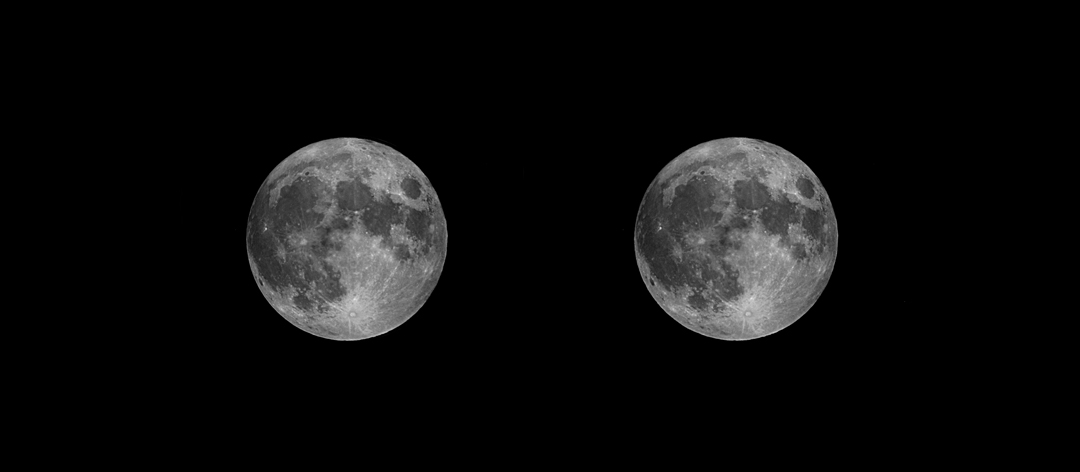
I have been trying various techniques to make realistic looking "3D views" from some of my astroimages for awhile. My most recent attempts seem to be working better than some of my earlier ones. Here is a "virtual moon globe". The images are a crossed-stereo pair (view right image with your left eye and left image with your right eye). Any feedback is appreciated.
Thanks
John
http://www.geocities.com/myastrostuff/
How to view (best if viewed in a darkened room with no reflections on the monitor):
1. At first, keep more than 15 inch between your monitor and your eyes. When viewing stereo images, don't tilt your head (keep horizontal level).
2. Look at the left side image with your right eye, and look at the right side image with your left eye. If you have trouble merging the images then try #3 or #4.
3. Place one of your finger at center between the monitor and your eyes, and look at the top of finger. You will see 3 images behind your finger, focus on the center image slowly. Then you will see it in 3D.
4. Another method to try is to cross your eyes and gradually uncross them until you get an image between the 2 displayed. When you get the center image set, gradually focus until the 3D image snaps into view.
Attached Image:
John Theodossy
http://geocities.com/myastrostuff/

