Folks,
I'm writing to solicit some help from seasoned
film imagers. I'm getting decent results, but
not as wonderful as some I've seen. So I hope
to pick up some pointers here.
You can also regard this as a processing challenge!
I've been using Elite Chrome 200 with standard
developing on a Tak Sky-90 with f/4.5 flattener/
reducer. The camera is a Pentax KX from the mid-
seventies. Scope is mounted on an AP400 GTO, with
auto-guiding via STV/e-Finder.
Focus is set using a spare Pentax body equipped with
a Ronchi screen at the film plane. I obtain best
focus with the Ronchi screen, and then slew the scope
back and forth (at 1X sidereal rate) using the Ronchi
grating as a knife-edge. I focus manually
(no MotoFocus). Then I swap out the focusing body
for the real camera.
For scanning, I use a (rented) Nikon 4000 or 8000,
scan at 4000dpi, 14 bit, 4x overscan, and
usually reduce to 2700dpi (via bi-cubic interpolation
in PhotoShop 7) for manipulation.
The attached example is an UNPROCESSED image of
Gamma Cygni. (I posted a processed version on
August 21, 2003.) This is actually a stack of
three exposures 2 x 1 hour + 1 x 40min, registered,
histogram matched ("calibrated"), and averaged
in RegiStar.
I believe this is a good starting point, but have
some questions
(i) I *believe* the focus is good. The next post
has a portion of the image at full scale (i.e.
2700 dpi). How does one critically assess focus?
(ii) The brighter stars have a definite RED halo.
Presumably this is from scattering in the red layer.
Is there another currently available astro film that
doesn't show this so prominently?
Is there a recipe for removing this in PhotoShop 7?
(iii) When I stretch the histogram to enhance the
nebulosity, the stars bloat, and sometimes merge.
I've used the star reduction trick in Jerry Lodriguss'
book, but I rather dislike routines that make me change
the image to 8 bit before the very end ...
More to the point, I'd prefer to select the
complement of the stars BEFORE stretching
the histogram. Any suggestions?
I've also tried the Screen-Mask-Invert routine,
from Jerry's book, but always get low-contrast results.
Enhancing the contrast then bloats out the stars,
so this isn't working for me.
(iv) I understand that negative film has greater
dynamic range than slide film. Any particular
suggestions for currently available negative film?
What improvements might I see relative to Elite Chrome
200? What's the down side?
Thanks in advance. I'm hoping the more seasoned
imagers can help me make progress. At the moment,
mine aren't getting any better.
Thanks in advance.
Todd
I'm writing to solicit some help from seasoned
film imagers. I'm getting decent results, but
not as wonderful as some I've seen. So I hope
to pick up some pointers here.
You can also regard this as a processing challenge!
I've been using Elite Chrome 200 with standard
developing on a Tak Sky-90 with f/4.5 flattener/
reducer. The camera is a Pentax KX from the mid-
seventies. Scope is mounted on an AP400 GTO, with
auto-guiding via STV/e-Finder.
Focus is set using a spare Pentax body equipped with
a Ronchi screen at the film plane. I obtain best
focus with the Ronchi screen, and then slew the scope
back and forth (at 1X sidereal rate) using the Ronchi
grating as a knife-edge. I focus manually
(no MotoFocus). Then I swap out the focusing body
for the real camera.
For scanning, I use a (rented) Nikon 4000 or 8000,
scan at 4000dpi, 14 bit, 4x overscan, and
usually reduce to 2700dpi (via bi-cubic interpolation
in PhotoShop 7) for manipulation.
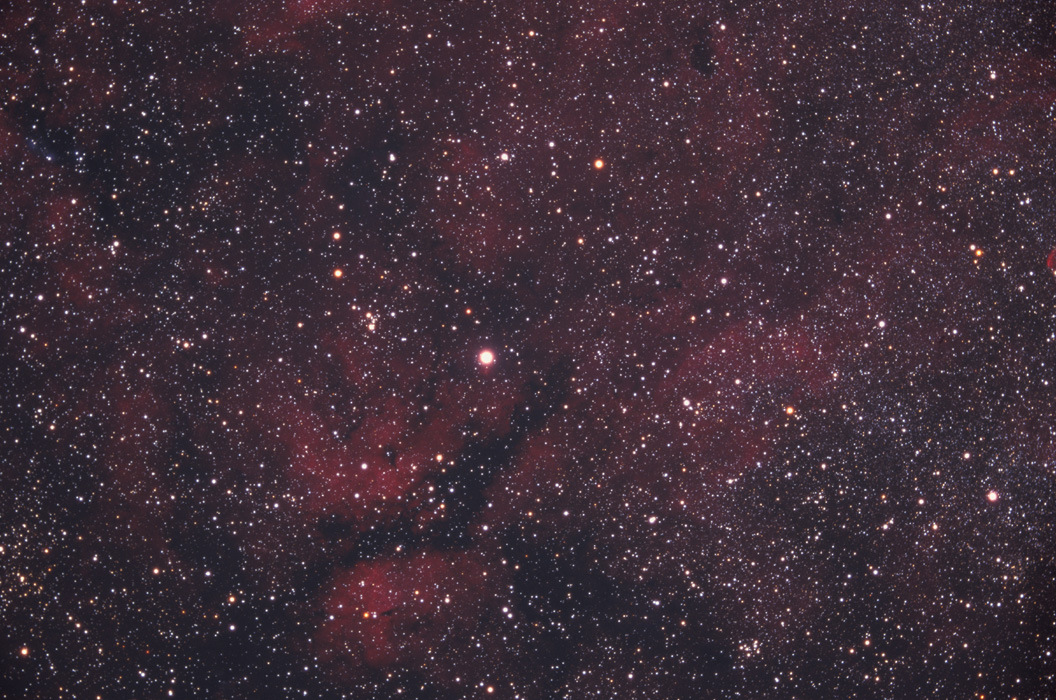
The attached example is an UNPROCESSED image of
Gamma Cygni. (I posted a processed version on
August 21, 2003.) This is actually a stack of
three exposures 2 x 1 hour + 1 x 40min, registered,
histogram matched ("calibrated"), and averaged
in RegiStar.
I believe this is a good starting point, but have
some questions
(i) I *believe* the focus is good. The next post
has a portion of the image at full scale (i.e.
2700 dpi). How does one critically assess focus?
(ii) The brighter stars have a definite RED halo.
Presumably this is from scattering in the red layer.
Is there another currently available astro film that
doesn't show this so prominently?
Is there a recipe for removing this in PhotoShop 7?
(iii) When I stretch the histogram to enhance the
nebulosity, the stars bloat, and sometimes merge.
I've used the star reduction trick in Jerry Lodriguss'
book, but I rather dislike routines that make me change
the image to 8 bit before the very end ...
More to the point, I'd prefer to select the
complement of the stars BEFORE stretching
the histogram. Any suggestions?
I've also tried the Screen-Mask-Invert routine,
from Jerry's book, but always get low-contrast results.
Enhancing the contrast then bloats out the stars,
so this isn't working for me.
(iv) I understand that negative film has greater
dynamic range than slide film. Any particular
suggestions for currently available negative film?
What improvements might I see relative to Elite Chrome
200? What's the down side?
Thanks in advance. I'm hoping the more seasoned
imagers can help me make progress. At the moment,
mine aren't getting any better.
Thanks in advance.
Todd
Attached Image:

