current update

Started by AstroMart, 04/18/2018 03:49AM
Posted 04/20/2018 10:02AM | Edited 04/20/2018 10:05AM #10
Originally Posted by Michael Castellini
Vlad,

YES!!!   That is it, and the fix worked....the time stamp/badge/label shows up correctly now.....thank you for working on this and finding the coding solution.

Mike
Vlad,
I thought we had it.....but not quite.

The system switched at what I think must have been GMT midnight to "yesterday".  So, all the classifieds coming in tonight (eg 1800 hr) are now saying "yesterday" because it is yesterday GMT.  I now see all of the classifieds that  came in today, are now saying "yesterday". Something in the system is still coding  "yesterday" and "today" based on GMT, not on our own time zones. 

Thanks for the continued effort on this timing bug....

Mike
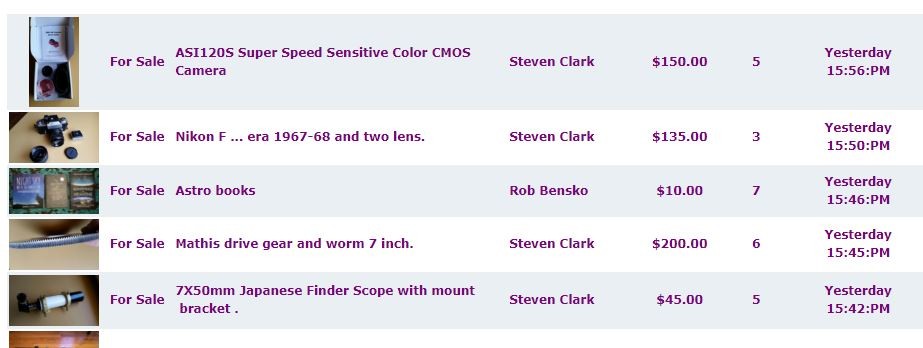
Posted 04/20/2018 09:52PM | Edited 04/20/2018 11:41PM #11
Vlad,

Thanks for continuing to work on this. 


1.  If NOT logged in, all is fine. "Yesterday" and "Today" are correct,  because it defaults to GMT and switches the label at 0000GMT.  

2.When I log in, the -8GMT works just fine for the digital time stamp (e.g. it shows 0630 AM right now)....that has been OK with the new Astromart site from the start.


3. The issue is when does the system apply the badge "Yesterday" if I am logged in?  At my "yesterday" (-8GMT) or the system "yesterday" (0000 GMT?)


4. Now, at 0630 all my logged in labels are correct, because it is only  1430 in London.  The test will come at 1600 local Alaska time, when "today" becomes "yesterday" GMT. If fixed, "today" will remain "today". If not fixed, "Today" will become "Yesterday" and items listed after 1600 local AK time will show up as "Yesterday".


So, I won't know the answer for until 1600 local.


Thanks for helping track this behavior.


Mike
Posted 04/21/2018 07:31AM | Edited 04/21/2018 08:33AM #12
VLAD.......

TIME BADGE ERROR STILL THERE

I logged in a few minutes ago, and at 1600 local Alaska time, all of the recent classifieds were relabelled from TODAY to YESTERDAY...   This was our prediction if the badging is taking its data from midnight GMT. 

So, the digital time  at -8 GMT is correct as shown in the photo, but they get relabeled based on GMT midnight switching to Yesterday.

Mike.

YIPES....if you need more data, I wrote this just an hour ago, and it shows as YESTERDAY in the label!!!!1

Ditto with the posts right after mine talking about the sizing on the laptop AND answer from Donald.

Attached Image:

msl615's attachment for post 156990
Posted 04/21/2018 08:04AM #13
There is still a problem with size using a laptop.  If using my zoom at 125% the ad banner
goes to the middle and fills it around 40% of the view.

I am only able to post this or view if I go to 100%.

I have posted this issue several times, I use Explorer and a full size laptop with a 15" screen.

Come on admin.  fix it right. 

This is the only website I have found that does this, so.............
Posted 04/21/2018 08:35AM #14
Originally Posted by Donald Marriott


Thank you, we have new designs being implemented next week.  The sizing will be fixed.
Donald,
Do you see the time badge label issue on your answer?  You wrote it just 20 min ago, but it shows up as "YESTERDAY".  "Yesterday" is taking its data from when GMT goes to midnight, not when we are writing or when classifieds are being posted on local time zones. 


Thanks,
Mike
Posted 04/21/2018 10:33AM #15
If this is where we are supposed to report Bugs, I have one.

Using name or email I am unable to get to the profile of the AM user that just pushed the button to buy an item I put up for sale.  I cannot review them for being a prompt and a great Amarter...

Am unable to do this.
Posted 04/21/2018 12:29PM #16
Originally Posted by James White
If this is where we are supposed to report Bugs, I have one.

Using name or email I am unable to get to the profile of the AM user that just pushed the button to buy an item I put up for sale.  I cannot review them for being a prompt and a great Amarter...

Am unable to do this.

Is it not listed under "unused ratings" on your account settings page?

20" MidnighTelescopes f/5
8" f/16 Muffoletto Achro
Meade 6" AR6 f/8.0 Achro
Celestron C11
Parallax PI250 10" F/5 Newt
Vixen FL102S,NA140SS,R200SS
80mm Stellarvue Nighthawk with WO APOupgrade lens, 90mm f/16.67 Parallax Achro
LXD75/LX200, Mini-tower, GP-DX, CG5 ASGT, LXD650, GM-8, G11, GM-100, GM-150EX, GM-200 and a Gemini G40
4" portable AP convertable 44" or 70" pier
Stellarvue M7 Alt-Az, TSL7 Pier/Tripod
12.5" f/5 MidnighTelescopes DOB Swayze optics
Monroe GA
Posted 04/21/2018 09:16PM #17
Hello, thank you much for the pointer it worked fine.  I have not done it that way before, usually I'd just do the user look up and it would always say 'you can rate this user for xxyz transaction' and went that route.
Posted 04/21/2018 10:33PM #18
Originally Posted by Vladimir Krsmanovic
Reply-To on classified response emails should be fixed now. Please report if any further issues.

Here is another issue (appears to be cosmetic only in nature) note how the email link in this post is displayed.

When one clicks on edit it is displayed properly but once saved it is not displayed properly but instead shows the command structure that should be hidden.

20" MidnighTelescopes f/5
8" f/16 Muffoletto Achro
Meade 6" AR6 f/8.0 Achro
Celestron C11
Parallax PI250 10" F/5 Newt
Vixen FL102S,NA140SS,R200SS
80mm Stellarvue Nighthawk with WO APOupgrade lens, 90mm f/16.67 Parallax Achro
LXD75/LX200, Mini-tower, GP-DX, CG5 ASGT, LXD650, GM-8, G11, GM-100, GM-150EX, GM-200 and a Gemini G40
4" portable AP convertable 44" or 70" pier
Stellarvue M7 Alt-Az, TSL7 Pier/Tripod
12.5" f/5 MidnighTelescopes DOB Swayze optics
Monroe GA
Posted 04/22/2018 12:21AM #19
Vlad,
Thanks, and I hope you can find the time badging coding to solve.

Mike