I have been using MaximDL/CCD 4.11 for image capture, sigma combining, and initial editing. But so far I have been having difficulty finding just the right adjustments to bring out the fine details in nebulae and galaxies and yet keep the brighter areas from dominating the image.
I'd love to have the newest Photoshop CS2, but the price tag ($599) is a little prohibitive at this time. So I tried the Photoshop Elements 3.0 (for around $50). I wasn't overly impressed in it's use the first few times I tried it. But today I discovered two features that work nicely at enhancing images, bringing out the faint nebulousness while toning down the brighter areas.
These are (in the menu structure):
ENHANCE, ADJUST LIGHTING, (1) SHADOWS/HIGHLIGHTS and (2) LEVELS.
While many of the Photoshop Elements 3.0 features do not work on a 16 bit TIFF file, these two do and to me make it worth the cost. I believe I could eventually get the same results by working within the MaximDL, but not with the ease of the sliders and instant on-screen updates as provided with these features of Photoshop Elements 3.0.
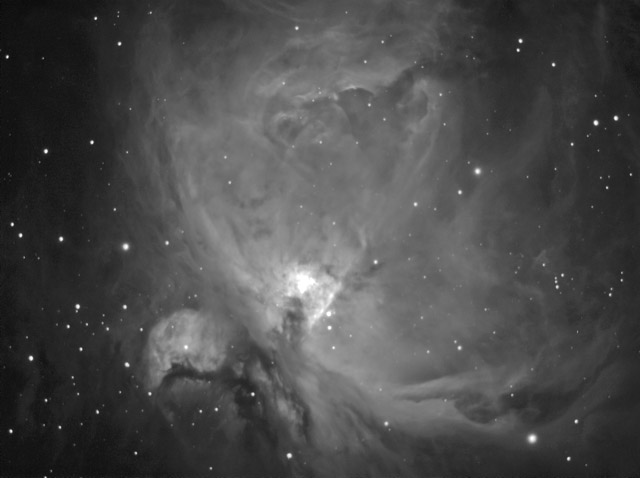
Keep in mind that, so far, I have only tried two 16 bit grayscale TIFF files as exported from MaximDL. These were the Horsehead Nebula and M42. So I cannot speak for using these features for color images yet. The attached images of M42 are before and after adjusting in Photoshop Elements 3.0, reduced in size to 640 x 480 then exporting as 8 bit Jpeg files.
I'd never want to do without my MaxinDL/CCD, but the Photoshop Elements 3.0 is starting to look like a nice companion program.
Note: I'm not sure if V1.0 and V2.0 work with 16 bit images.
Has anyone else been using these or other features of Photoshop Elements 3.0 or the newest V4.0 to enhance your images?
I'd love to have the newest Photoshop CS2, but the price tag ($599) is a little prohibitive at this time. So I tried the Photoshop Elements 3.0 (for around $50). I wasn't overly impressed in it's use the first few times I tried it. But today I discovered two features that work nicely at enhancing images, bringing out the faint nebulousness while toning down the brighter areas.
These are (in the menu structure):
ENHANCE, ADJUST LIGHTING, (1) SHADOWS/HIGHLIGHTS and (2) LEVELS.
While many of the Photoshop Elements 3.0 features do not work on a 16 bit TIFF file, these two do and to me make it worth the cost. I believe I could eventually get the same results by working within the MaximDL, but not with the ease of the sliders and instant on-screen updates as provided with these features of Photoshop Elements 3.0.
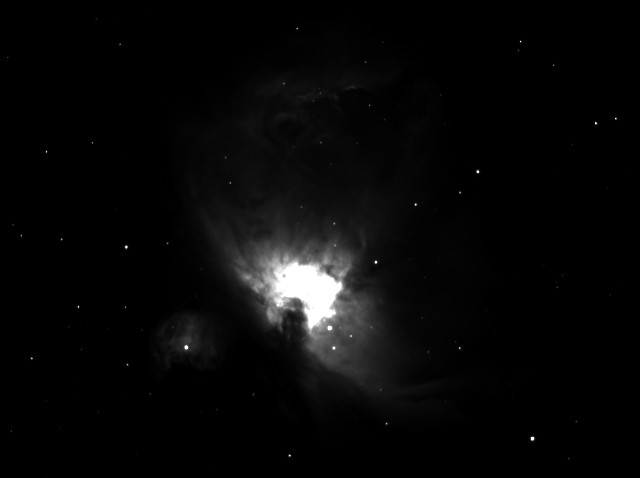
Keep in mind that, so far, I have only tried two 16 bit grayscale TIFF files as exported from MaximDL. These were the Horsehead Nebula and M42. So I cannot speak for using these features for color images yet. The attached images of M42 are before and after adjusting in Photoshop Elements 3.0, reduced in size to 640 x 480 then exporting as 8 bit Jpeg files.
I'd never want to do without my MaxinDL/CCD, but the Photoshop Elements 3.0 is starting to look like a nice companion program.
Note: I'm not sure if V1.0 and V2.0 work with 16 bit images.
Has anyone else been using these or other features of Photoshop Elements 3.0 or the newest V4.0 to enhance your images?
Attached Image: