Image of the day

Captured by
Byron Davies

Sh2-86 (NGC-6820)

My Account

New to Astromart?

Register an account...

Need Help?

Why are my colors so weak!!!

Started by Astrovale, 03/16/2008 12:48AM
Posted 03/16/2008 12:48AM Opening Post
Hello guys

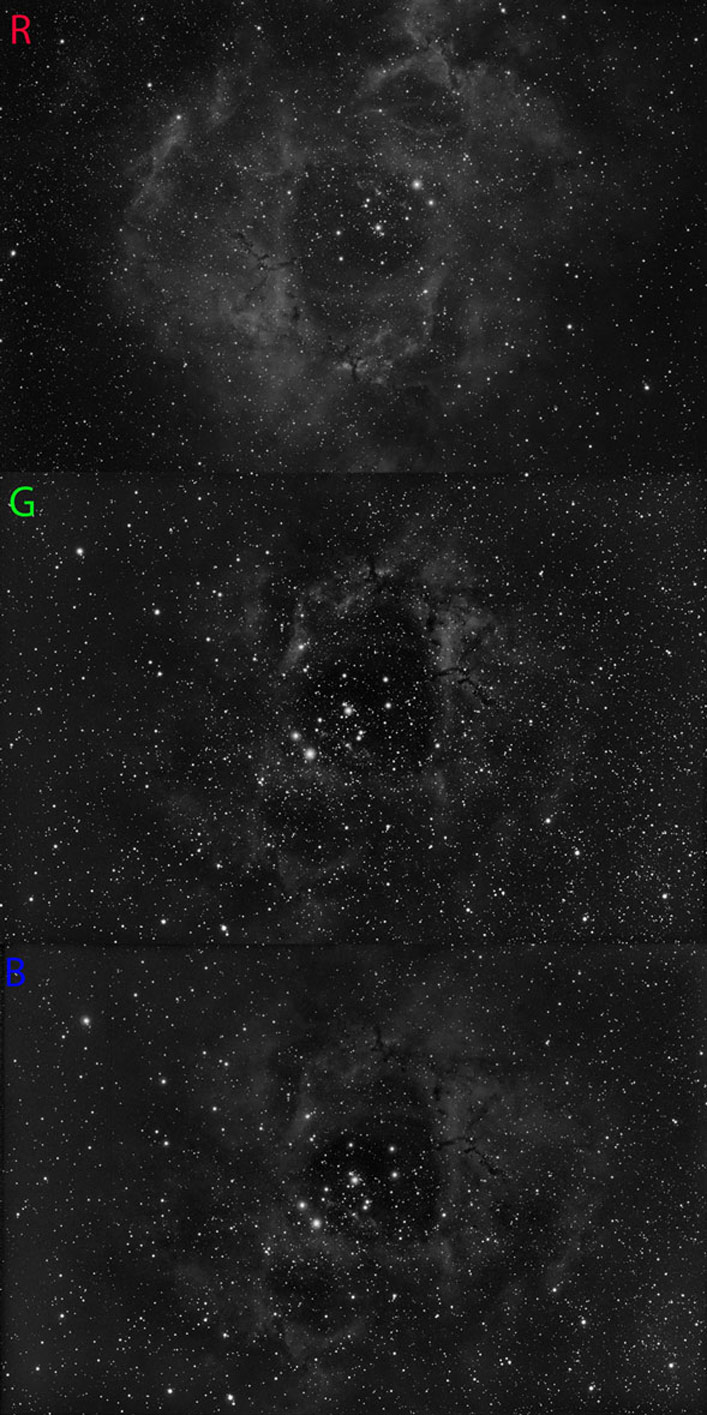
has anyone an idea of why my color channels are so weak?

These are the average combine of 12 10min subs taken with my TEC180 at F7 with the SBIG STL11000XM unbinned. I know I should have probably binned the exposures, but I wanted to keep the star size as small as possible to match what I considered a good h-alpha luminance.
However, I thought that 2 hours of color would have given me a pretty good result, but I was evidently very wrong :C

Any help/suggestion would be greatly appreciated: I'm loosing sleep over it, while I should loose it imaging sad

Ciao
Luca

Attached Image:

Astrovale's attachment for post 41270

www.amun-ra.org
Solar Imaging Website
Posted 03/16/2008 01:32AM #1
Hi Luca,

I think your color data looks not so bad wink
Color data always seems to appears weaker,at least to me.I guess because we are isolating the one specific wavelength.

After you combine them it should be pretty strong data considering the amount you have.
Adding Luminance data to the RGB using layers in photo shop will help beef up the color data too.You may have to do several layers and add saturation as necessary.

I would suggest either taking some Luminance or creating a Luminance from your color subs and some of your Ha data to mix in with your RGB color image if looks weak by itself.This should help strengthen it up.

Of course you could always take longer subs or bin too grin


Good luck!


Jason


Posted 03/16/2008 01:54AM #2
Luca, your data seems fine.... have you combined them already? how does it look after you did?

A luminance shot would definitely make your object brighter, but I would bet that your image is good as it is now...

Losing sleep over it? naaaah, you should not... wink

Ivan Gastaldo 8)
Coconut Creek, FL

Ivan's Observatory
Lat 26N 16' 48" Long 80W 10' 48"
[COLOR="Red"]Personal Website:[/COLOR] http://www.ivangastaldo.com

CCD Imaging and Processing/Deep Sky - Moderator
I like to complain about everything - Moderator
Posted 03/16/2008 02:23AM #3
Hi Luca,
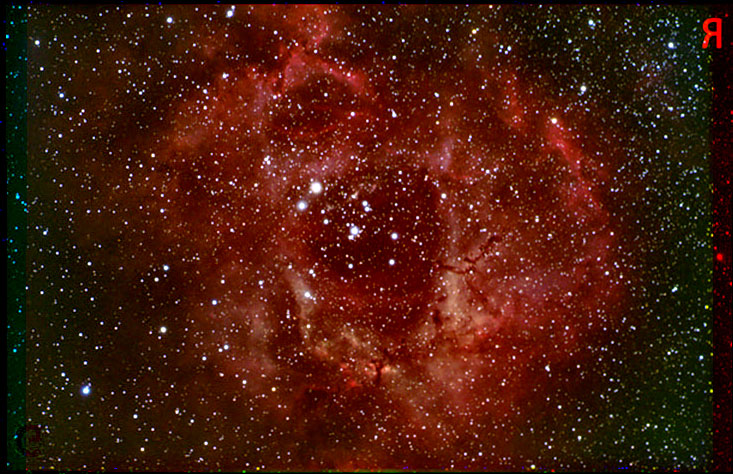
I agree, the color data seems fine to me. They are usually strongest in Red and weakest in Green. You would normally stretch the data somewhat to enhance the amount of color with photoshop or other means with the histogram.
I would say that you have plenty of data, now it is just combining them with the proper weight to get a good balance of color.
I just separated the three shots, made them color fits and combined them. Not the best because they were JPG to begin with, but it does show the results.
I think that there is a good picture here with good saturation too.

Attached Image:

fblue's attachment for post 121060

[SIZE="Large"][/SIZE][COLOR="Blue"][/COLOR] Floyd Blue grin
Amateur Imager
Posted 03/17/2008 09:28PM #4
Gianluca Valentini said:

Hello guys

has anyone an idea of why my color channels are so weak?

These are the average combine of 12 10min subs taken with my TEC180 at F7 with the SBIG STL11000XM unbinned. I know I should have probably binned the exposures, but I wanted to keep the star size as small as possible to match what I considered a good h-alpha luminance.
However, I thought that 2 hours of color would have given me a pretty good result, but I was evidently very wrong :C

Any help/suggestion would be greatly appreciated: I'm loosing sleep over it, while I should loose it imaging sad

Ciao
Luca

Hi Luca:

The linked article by master astrophotographer Robert Gendler helped me a lot. Often the luminance data initially overwhelms the color channels. This article is very helpful in dealing with this phenomenon, note though that the technique described is very Photoshop specific.

http://www.robgendlerastropics.com/LLRGB.html

Good Luck, Jim