Hi Mauricio,
The most critical items necessary to achieve good planetary results with a webcam are (in order of importance, first to last - IMHO) seeing, focus, and lastly camera settings.
You can't expect to capture the fine details of Jupiter's cloudbands unless the seeing is 7+, otherwise the details are washed out in the waves of turbulent air. If you monitor this forum for a while you'll see the best photos are from our colleagues in locations that typically have excellent seeing conditions. So, a good piece of advise would be to visit the "Clear Sky Clock" webpage at (http://cleardarksky.com/csk/) frequently and wait for a night of good seeing.
Second, focus is critical. For Jupiter, turn up the gain and brightness control on your webcam and focus on one of Jupiter's moons until you get it as sharp as possible.
Third, camera settings. These are the easiest to adjust especially if you use a free utility like Martin Burri's WcCtrl, which lets you modify the camera settings while viewing the live video. Use 5 or 10 frames per second for capturing. Higher frame rates cause the camera circuitry to compress the images, thereby losing detail.
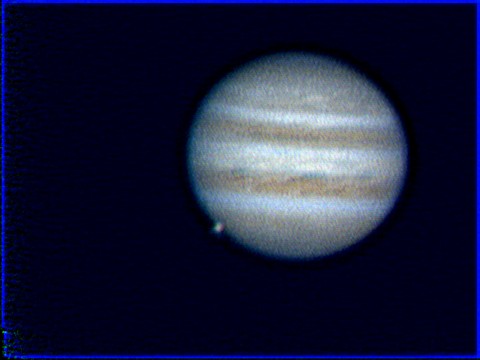
I've attached a image of Jupiter and Ganymede I took on April 19 under 6-7/10 seeing. I used a Toucam 740 webcam on a Meade ETX-125, a very similar setup to the one you are using. Earlier in the night I was using a 2X Meade Barlow to increase the focal length of the ETX-125 to 3800mm (F30). When I was about ready to quit for the night I decided to try to see if I could even capture an AVI using a TAL 4X Barlow (efl of 7600mm, F60). I had a difficult time keeping Jupiter centered on the CCD chip and had to constantly "fight" the RA drive, due to imperfect alignment. However, I managed to capture 900 frames (90 seconds @ 10FPS) and stacked them using Registax V2, then applied Wavelets and finished up with some unsharp masking in GIMP. This image is reduced in size 25% from the original. I consider it to be one of my best results.
So, keep trying. Even when the seeing isn't the best you can always practice focusing and learning what camera settings will work for you. Then you'll be prepared when one of those "once-a-year" nights of excellent seeing comes 'round.
Clear Skies,
Weiman Kissinger
Attached Image: