Solving the "ringing" problem with processing
Started by ttolla, 02/05/2005 03:00AM
Posted 02/05/2005 03:00AM
Opening Post


Posted 02/05/2005 03:09AM
#1
Tom,
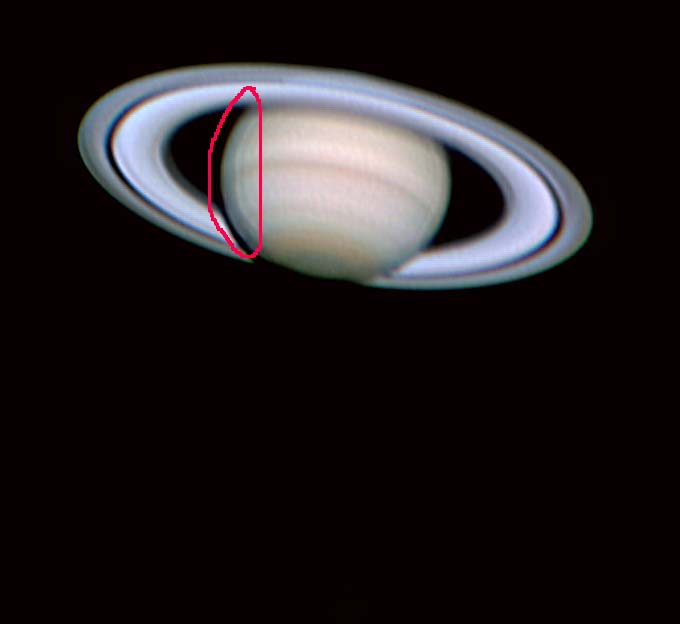
Ringing is a complex phenomenon caused by the right combination of mask radius, patterns of light and dark in your frame, the physical dimensions and separations of those patterns, and pixel grain. Change any of those variables, and the ringing will be affected, especially if you shorten the mask radius you've sharpened with, or the strength with which it was applied. Try sharpening with a shorter radius, for starters, and see if that helps. I will upload a few files later for your inspection.
Maurizio
Ringing is a complex phenomenon caused by the right combination of mask radius, patterns of light and dark in your frame, the physical dimensions and separations of those patterns, and pixel grain. Change any of those variables, and the ringing will be affected, especially if you shorten the mask radius you've sharpened with, or the strength with which it was applied. Try sharpening with a shorter radius, for starters, and see if that helps. I will upload a few files later for your inspection.
Maurizio
Posted 02/05/2005 04:58PM
#2
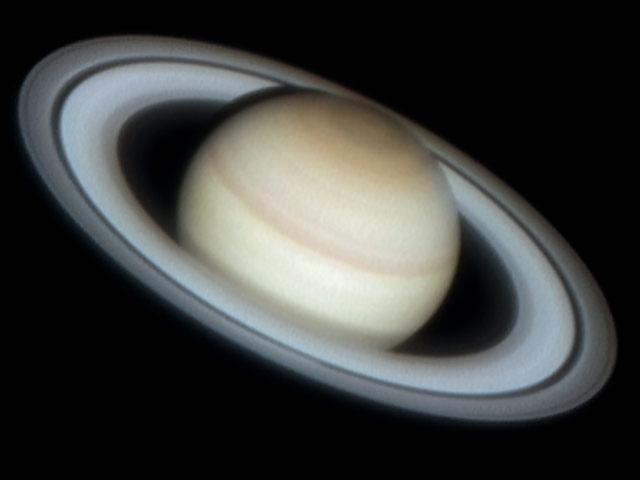
Ringing can also give you false Enke divisions. I'm beginning to suspect that a lot of the Enke divs that show up in images may be the result of unsharp masking pulling in the black from the edge of the rings and creating a ringing shadow. I found a super image of Saturn taken from Pic du Midi with the 1 meter reflector which shows the real Enke as seen from earth. It also does not show it sliding from the edge towards the middle of the A ring as most amateur images seem to do.
Roland Christen
Roland Christen
Attached Image:
Posted 02/07/2005 03:25PM
#3
I notice this same effect if I try to crank up the detail using Registax wavelets. It is very easy to overdo it. Use just enough to clarify the edges and then save the image and apply a small radius unsharp mask in an image editing package to sharpen. Also try using the planet limb as your alignment feature and see if it helps . A far as gain goes, more is better-just don't saturate.
Funding Member