Image of the day

Captured by
Byron Davies

Sh2-86 (NGC-6820)

My Account

New to Astromart?

Register an account...

Need Help?

M42 with New Eyes

Started by dan kowall, 01/25/2006 01:24AM
Posted 01/25/2006 01:24AM Opening Post
I got a new monitor the other day to replace the small CRT that I've been using. I went to my website to see how the images looked with the new monitor, and was aghast to see how horrible they appeared. Apparently all of the warts that were hidden on the CRT are now glaringly obvious on the new monitor.
What's also obvious is that I'm going to have to reprocess most of the images on my site, but that's okay, I need the practice.
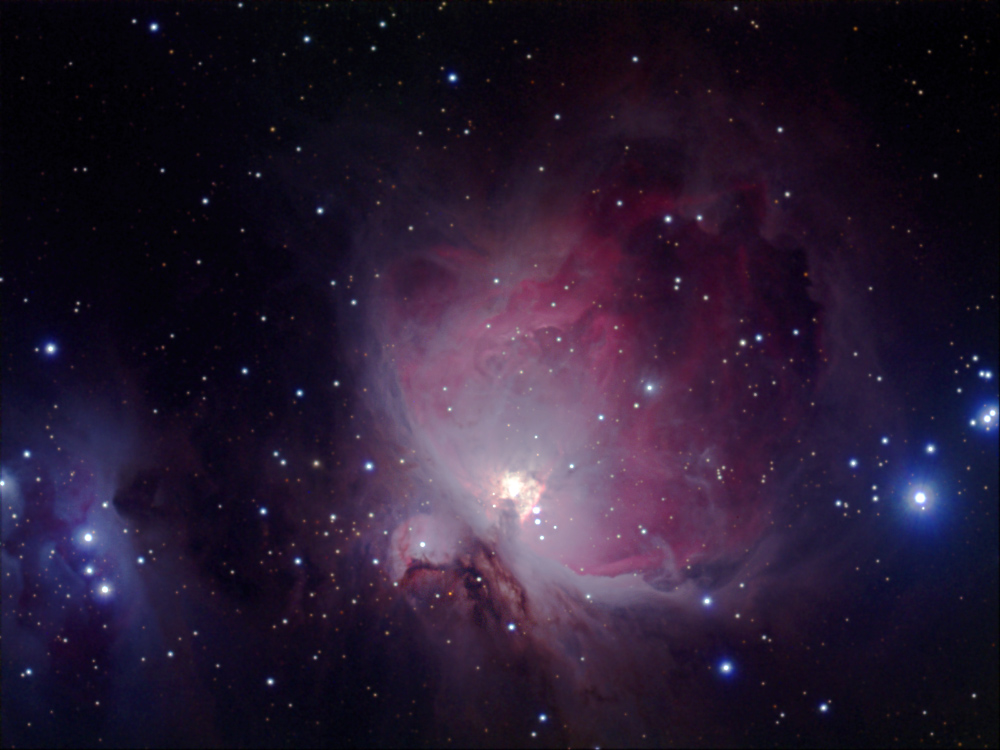
Attached is the first image that I've reprocessed, M42.
A larger image and details can be found here:
http://www.photonhunter.com/M42.html
This is also the first image that I've processed with CCDStack, which seems to work pretty well.
Let me know how this image appears on your monitor.
Thanks,

dan kowall
Attached Image:

dan  kowall's attachment for post 29348
Posted 01/25/2006 01:35AM #1
Looks good to me!

Tom

Starsearch Observatory
Lat 42N 47' 00" Long 112W 10' 47"
Elev 1752m
www.tvdavisastropics.com
Posted 01/25/2006 02:54AM | Edited 01/25/2006 02:56AM #2
Looks nice to me. If anything, a tad darker than the average M42 portrait I see, but that might be MY monitor.

Uncalibrated monitors are a total crap shoot. The Adobe Gamma utility has always done alright by me on CRT's but it's a total miserable failure since I switched to LCD's. I think the only correct way to go is to get some kind of color calibration system that attaches to the screen and measures the colors and brightness variations produced by the computer. Then it produces a monitor profile that yields repeatable results. Without a calibrated monitor, only luck will help. Of course, the unwashed masses (like me) have uncalibrated monitors anyway, so who knows what they are displaying.

Posted 01/25/2006 05:16AM #3
Dan,
I've always admired your images on your website. I guess I really don't see "warts" that well.

Anyway, your posted M42 is a great image - it does appear a bit dark on my monitor. I can turn my gamma a up pretty high and it still looks good. If I do the same for my images, the warts really pop out.

Jim Thommes

Mak-Newt 152 mm
C8
Megrez II APO
Zenithstar 66 mm APO
G11/Gemini
ST8300M
Artemis285 Camera
Canon 350D DSLR

http://jthommes.com/Astro/
Posted 01/25/2006 12:38PM #4
Dan,
Really nice image. Looks good here on my work monitor.
Larry
Posted 01/26/2006 03:15PM #5
Thanks for the feedback, guys.
I don't have a Spyder-type monitor checker, but I have gone to some test image sites where I can see all 255 grey shades and get very lifelike colors, so I think the new monitor is pretty close to being adjusted correctly.
My final processing is done on a Mac, so there's always the question of where to set the gamma on the finished image. I should probably apply a lesson I learned as a carpenter: When faced with the choice of two different measurements-"Just split the difference!". That would, I think, leave images slightly bright for Mac users and slightly dark for the PC people.

dan
Posted 01/27/2006 05:23PM #6
I found this DVD to be helpful for monitor calibration:

http://tinyurl.com/bsjzf

It's indispensable for home theater calibration (it's amazing how far off most TV's are), which means it includes some functions that don't apply to computer monitors. However it's excellent for grayscale adjustment, brightness/contrast setting, geometry, and color calibration (it comes with a set of gel filters to help with this aspect). HTH,

Tim Iafolla
Posted 01/29/2006 05:45PM #7
Looks great on my 17 inch LCD. Beautiful shot. Thanks to people like you I can see, and enjoy things my Questar 3.5 can't provide.
