Image of the day

Captured by
Yue Ma

HFG-1

My Account

New to Astromart?

Register an account...

Need Help?

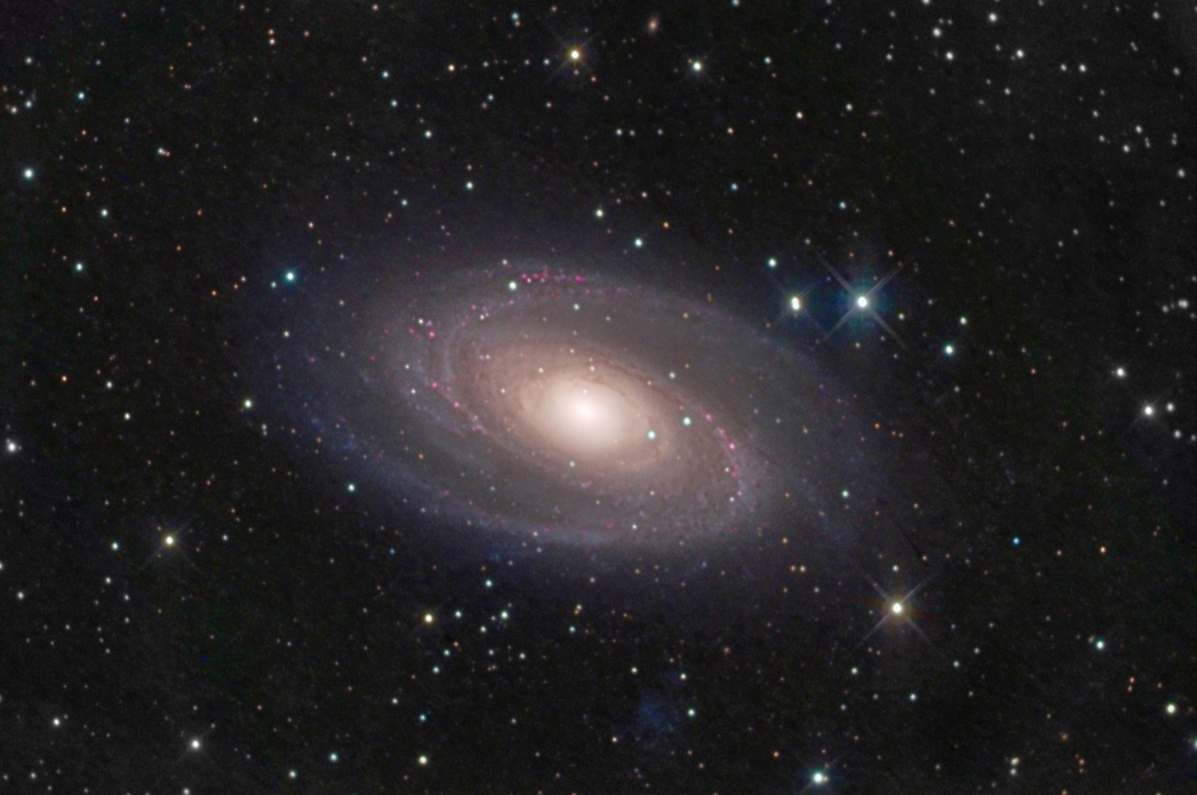
M81 First Light Image

Started by jperonto, 06/12/2007 06:56PM
Posted 06/12/2007 06:56PM Opening Post
This is my first image with an SBIG ST-8 that I purchased used. It was taken with a 10" F/4.5 Newtonian with a Baader Coma Corrector and exposed for nearly five hours. It has a little too much noise and is indicative of the poor seeing at the time. Sean Walker helped me with the processing and brought out most of the info in the original files. Any comments or suggestions would be very much appreciated
Attached Image:

jperonto's attachment for post 37484
Posted 06/12/2007 07:38PM #1
That's a wonderful image Jeff! 8) (great detail & colors captured)
Have you been imaging before? if so, what equipment did you use before this ST-8?

Looking forward to your next shots!

Ivan Gastaldo 8)
Coconut Creek, FL

Ivan's Observatory
Lat 26N 16' 48" Long 80W 10' 48"
[COLOR="Red"]Personal Website:[/COLOR] http://www.ivangastaldo.com

CCD Imaging and Processing/Deep Sky - Moderator
I like to complain about everything - Moderator
Posted 06/12/2007 07:52PM #2
hi Jeff,

congrats on this splendid etup!
also the image of m81 is very nice! h2 regions show up nicely, details are great!
my only comment would touch the background...it is a slightly noisy.
have You tried Pix Insight LE ? this programme is erfectly dedicated for background noise reduction!
http://pleiades-astrophoto.com/index.html


clear skies, guys!
Dietmar
---
www.stargazer-observatory.com
Posted 06/12/2007 07:57PM #3
Let me echo all that Ivan and Dietmar said: what a great shot! I'll also second Dietmar's endorsement of PixInsight for background noise reduction. Gives you great control and can be implemented on the background only through masking, so you don't even touch the galaxy.
Can't wait for more from that new camera,
Larry
Posted 06/12/2007 08:09PM #4
Comments? Wow! Well, okay, reduce the background noise as everyone else said, but the galaxy is stupendous!

Eric
Posted 06/12/2007 10:53PM #5
Wow, wonderful image! The next version of Images Plus is going to have a background noise smoothing feature which should be very handy.

Photoshop CS2 has a noise reduction feature which is good also. You can use the blurring tool to rub specific areas to reduce noise or lasso an area, feather it then use a Gaussian blur (1 pixel) to smooth background noise. Another approach is using levels and shifting the black point on the histogram to the start of the bell curve as that area to the left of the histogram is the noise in the dim areas.

Greg.
Posted 06/13/2007 12:53AM #6
Jeff,

Impressive first light image, very well done.

Thanks for sharing!

Keith

[COLOR="Navy"]“Heaven wheels above you, displaying to you her eternal glories, and still your eyes are on the ground” --Dante[/COLOR]
Posted 06/13/2007 02:37AM #7
That is one beautiful image! I’m envious!

Joe
Posted 06/13/2007 03:02AM #8
Wonderful shot jeff !

Regards


Louie  8)

www.atalas.net
