Image of the day

Captured by
John Roach

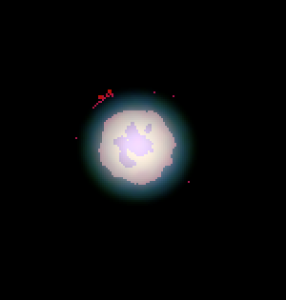
Enhanced Uranus showing Polar Cap and possible Aurora

My Account

New to Astromart?

Register an account...

Need Help?

Lumenera Camera using Registax. Please Help

Started by Jim Phillips, 06/24/2005 09:33PM
Posted 06/24/2005 09:33PM Opening Post
Leaving beautiful Lucca early in the morning so I will check this when I get home. Paolo Lazzarotti came over this eveing. We had a wonderful time together. He downloaded the software for the Lumenera camera and hooked it up. We took some test images and everything seemed fine. BUT, when we tried to use Registax the following occured. After selecting the AVI, when we tried to click the crosshair on the image we got the following error code:
"access violation at address 004F9882 in module 'registax 3D.exe'. Read of address 03DCB009"

We could not use registax. Can anyone help? Thanks!

Jimk Phillips
Posted 06/24/2005 09:55PM #1
Jim,

Did you do a conversion from Seq to Avi, or did you capture straight Avi? If the first, maybe the Avi had a "tweak" in it that Registax didn't like. I remember that Registax is particular about some avi's. You might try running it through Virtualdub and see what happens. Otherwise, you got me...you could send email to Cor and see if he has any ideas.

Paul

Paul Maxson
Moderator - CCD Imaging and Processing/Solar System
Celestron C14, Mewlon 250, Orion EON120, ASI120MM, Flea3.
http://www.sunspot51.com
Posted 06/24/2005 10:39PM | Edited 06/24/2005 10:53PM #2
Hi Jim,

What size is the file you are trying to run in Registax if it is over 1GB that may be the problem, I convert my Seq. files to AVI in Streampix using a Lead (brand name) compression CODEC which is a basically lossless compression algorithm and the files work fine in Registax V3.

Wes Higgins
Posted 06/24/2005 11:06PM #3
Jim,
I have had this error as well when I tried to register and stack AVIs that I separated into Lum and RGB in QFocus. My ToUcam was changed to RAW mode via the TWIRG eeprom flash. It processed the color AVIs but the Lum channel came up with the same error.
Let me know what you hear.

Bryan
Posted 06/25/2005 01:16AM #4
I'd reccommend that you use virtualdub to split your AVI out into individual frames (BMP files) and then use Windows select-drag-drop to select these files and drag-drop them into registax.

This seems to be the most reliable way of loading data, and avoids many limits such as the avi filesize. I've successfully used this method to drag n drop about 10,000 files in one go, and I've been doing it this way for the last couple of years and never had a crash like you mentioned above. I've seen many other people report crashes when loading AVI's.

I think this process is much simpler for Registax to handle.

I hope you have a lot of spare disk space :-) Virtualdub is free, just google for it.

Alternately, if you can, capture your original data into separate frames to start with, and then you can avoid these conversion steps altogether. That's what I do, even though it burns up disk space like you would not believe :-)

regards, Anthony

http://www.acquerra.com.au/astro
Posted 06/25/2005 06:40PM #5
Hello Jim,

sorry I did not know you were going to meet Paolo: I would have joined with pleasure.

However, I had all sorts of problems with Registax and Iris and the avis translated from .seq into Streampix. I found out that the only way to process those files is to re-pass them into virtualdub which is a very simple freeware that you can download from the net and then just open the avi exported from streampix and re-save it as avi again: don't ask me why it works, but I can assure you it does. As soon as the fit export will work then Iris will be the way to go 8)

Ciao Jim

Luca

www.amun-ra.org
Solar Imaging Website
Posted 06/26/2005 12:13PM #6
Hello everyone. I downloaded virtualdub, opened one of the AVIs thast Paolo and I made, then saved it as an AVI. I then opened Registax and....It Works!!!
Thank you all very much. This is a wonderful group. You are all the Greatest!

Jim Phillips
