.... a mistery rising

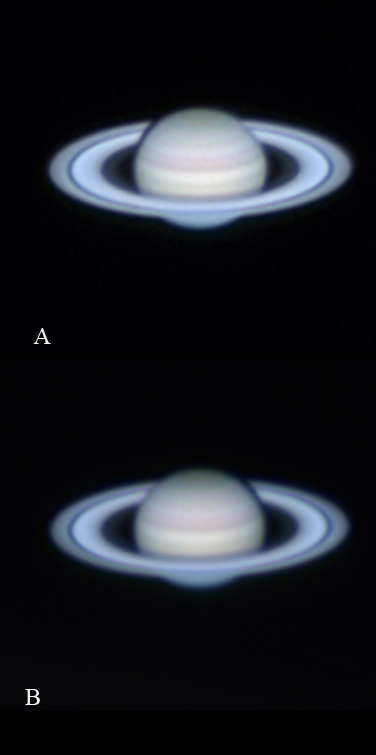
The 2 pictures have been processed exactly the same way! There is no more sharpening or more processing of any kind to the 2 resulting LRGB images:
The only difference is that in version A I have set the RGB layer as NORMAL in the drop down of the layer's pallette, whereas in version B I chose the option COLOR for the RGB layer. The B&W layer was always used as LUMINOSITY (which I guess is equivalent to LUMINANCE) and was applied on top of the RGB picture which was then resized being smaller than the B&W.
So, the mistery is now why the difference is so evident and why the effect is so strikingly different between the "ring area" and the "orb area"? I agree with Alan and I think it would be great to have the ring area from picture A and the orb from picture B: Can that be accomplished in Photoshop? And, if yes, how?
Ciao guys and thanks for letting me have your valuable opinions.
Luca
PS special question for Alan: don't you think that the mistery could be that in fact the pictures retain their processing when merged with the RGB layer as NORMAL, while they don't when merged simply as COLOR? In other, and perhaps clearer, words, couldn't it be that picture A has the processing of both layers somehow summed, while picture B retained only the processing of the luminance layer? As a matter of fact, the RGB picture was especially well defined in the rings area and that could explain why the outcome LRGB was much better in that section when merged with that layer as normal.